Static electricity troubles
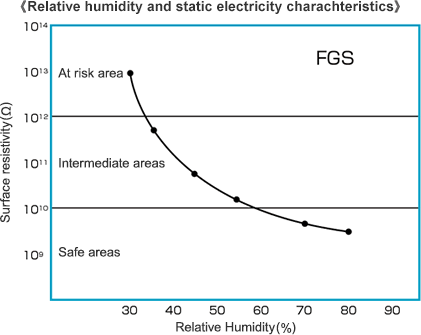
- To prevent problems relating to static electricity, the most important factor is the relative humidity of printing room.
(For example, problems with paper delivery, sheet alignment, and adhesion of paper dust and other substances.)
- Always keep the relative humidity in the area around the printing press at 50% or more.
(When heating during the cold seasons, temperature adjustment should be carried out at the same time.)
- Ionized air is also effective when combined with a static removing device, but this will not function effectively when the relative humidity is below 40%.
- For double-sided printing, the side that should be printed first is the side with the lighter printing area. When the surface of a YUPO sheets are covered by ink, the ink can become charged.
(Ensure humidification so that the area around the printing press has a relative humidity of 60% or more.)
- When an infrared heater is used to enhance drying, the humidity is greatly reduced in that area. For this reason, problems are likely to occur such as misplacement in paper discharge and irregular spray powder patterns. Be sure to keep the area around the printing press at a relative humidity of 60% or more.